The bot creation form in the BotFather Mini App has received a second username field. It is optional, checked by a separate method, and sent to the server along with the rest of the form data. This change is currently live on one out of four serving stands.
What Changed in the Code
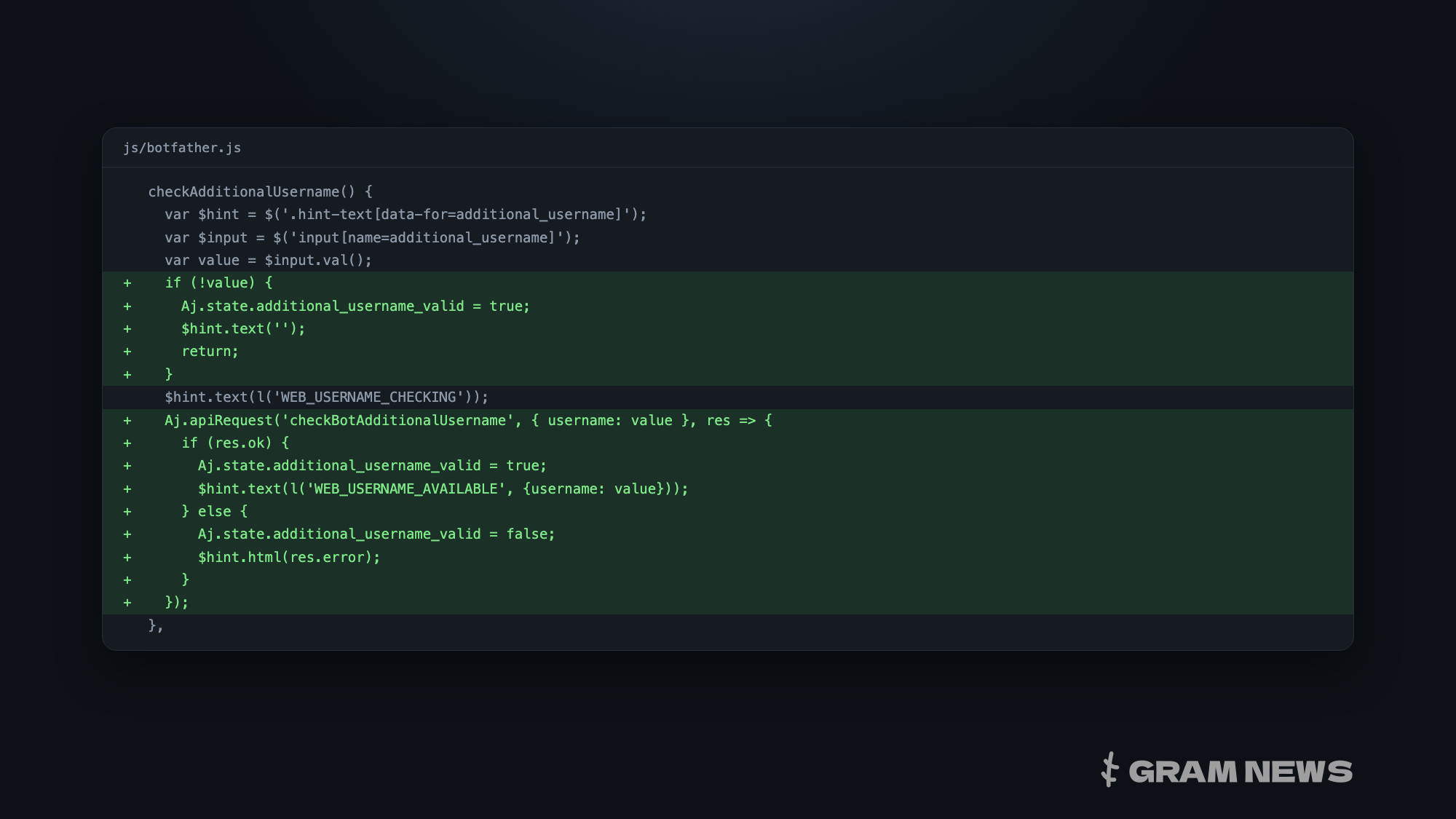
botfather.js is the web-BotFather, a Mini App where bots get their token, commands, and profile set up. Forty-six lines have been added to it.
The field is called additional_username, and its status flag is set to 'valid' upon page load — an empty form field does not block submission. It has its own delay timer: editing the field triggers a check after four hundred milliseconds, while leaving the field triggers it immediately, without delay.
The validation sends a request to the server using the checkBotAdditionalUsername method and parses the response into three hint states: 'checking', 'available', and 'error'. The error text is not assembled on the client side but is printed as-is from the server. Form submission is only blocked by a non-empty username that failed validation, and the createBot method now includes an additional parameter for this username.
No new interface strings have been introduced for the field: the hints use the same keys as the first username.
Whether payment is required for a second name is not visible from the code. Its prompts are the same as for the first, free name — "checking" and "available" — and there are no words about Fragment, Stars, or purchase in the file. However, if there is a price, it resides on the server: the client only asks if the name is available and prints the response.
Why This Is Not a New Mechanic
The Telegram protocol has long supported multiple usernames for a single account. The API schema includes a separate username type with 'editable' and 'active' flags — this is how collectible usernames sold on Fragment are structured, and additional usernames for channels look the same.
For bots, a page listing their usernames already existed in the same Mini App: a separate screen and method for adding a username to an existing bot. What's new here is precisely one thing — a second username can be set the moment the bot is created, rather than having to add it separately later.
Why — the code does not say. It contains neither a label for the field, nor a hint, nor a condition under which the field is displayed: this entire part of the form lives in the markup provided by the server, which is protected by the Mini App's authorization.
Why No One Can See the Field Yet
Telegram serves static content from several stands, and they are not synchronized: these are branches, not copies. Today, the second name is only available on one of them — the file there weighs 95,172 bytes. The working BotFather mini-app, which opens from Telegram, retrieves the file from webappinternal.telegram.org, and there lies the previous version at 93,463 bytes: the creation form has three fields — bot name, description, and username.
In the working code, the method is not new: it is already called by the screen for adding a name to an existing bot, passing the bot number along with the name. However, the production server does not execute it. With its own bot number, it responds with Method not found, as if to a non-existent method; without a number, it responds with Unauthorized. The server-side implementation for a bot's second name is not yet present, neither during creation nor for an existing bot.
There is currently no way to view the field itself: the files for the stand are accessible to anyone, but any address for the form itself is protected by mini app authorization and returns a 403 error. The web BotFather does not have an open page, and there is no button to launch the application on the bot's t.me page.
In correspondence with @BotFather itself, the form still asks for a single username.