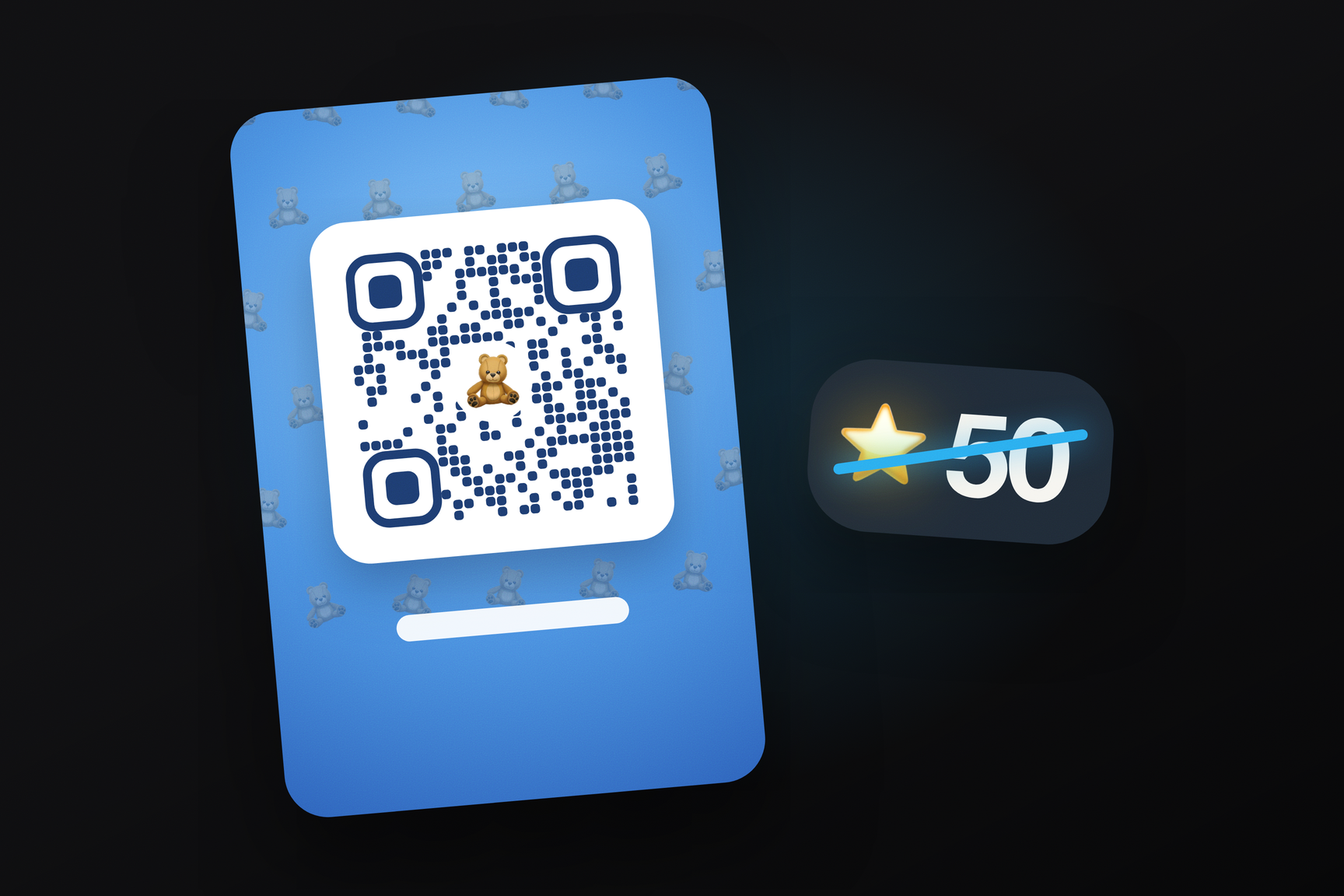
A new profile QR code screen appeared in Telegram for macOS beta build 13.0.283320 on October 15. In the code, it's called the QR studio: the background and pattern around the code are generated from a collectible gift, premium emoji, or a color. The same screen features a “Remove message fee” toggle: it transforms the QR code and its associated link into a pass that bypasses the message fee — anyone who uses it can message the owner for free. This applies to both those who charge Stars for incoming messages and those who message them. Currently, these features are only available in the Mac beta, and they are not yet present in the open API scheme.
What's New in Build 13.0.283320
The macOS beta is distributed via the update feed mac-updates.telegram.org. On October 15, three consecutive builds were released: 283318 in the morning, followed by 283320 and 283321 in the afternoon. The interface for both features appears in 283320 — specifically, the QrStudioUI module and the NoPaidMessagesToken core file. API type descriptions for the free link were already present in the client since the morning build 283318, but without a screen to invoke them. Build 283321 was released forty minutes after 283320 and retained both features.
The texts for the new screens in the beta are written directly in English within the code; they have not yet reached the translation platform. The exception is two service messages in the chat regarding the free link: these were added to the localization file of the same build.
How the Free Message Link Works
In Telegram, you can set a price in Stars for messages from contacts not in your address book. For a specific person, the fee can currently be waived manually by adding them to exceptions: the API scheme includes the account.toggleNoPaidMessagesException method for this purpose. The beta adds a second way: the exception is granted via a link, eliminating the need to manually add the interlocutor.
This is enabled by the “Remove message fee” toggle on the QR code screen. After activation, the QR code and its link contain a token, which the client calls noPaidMessagesToken. Anyone who opens such a link sees “You can now message …” with the owner's name, and their subsequent messages are free. A service message remains in the chat for both parties: for the owner, it's “… used your link to message you for free”; for the person who used the link, it's “You used …’s link to message for free”.
The token's expiration is set on the same screen:
| String in the beta | What happens |
|---|---|
| “Expire after 1 minute” | the code is valid for one minute — “This code will expire in 1 minute” |
| “This code no longer expires” | the code is permanent |
| “New code created. The old one no longer works.” | the code has been regenerated, the old link no longer works |
| “Restore message fee” | the fee is reinstated — “Your message fee applies again” |
The one-minute code is likely intended for in-person meetings: show the QR on screen, let it be scanned — and after one minute, any picture forwarded further will no longer open anything. The client responds to an expired or revoked link with the message “This free message link is invalid or has expired”, and the server returns a NO_PAID_MESSAGES_TOKEN_INVALID error in this case.
How this differs from an "add to contacts" link
Telegram has long had a temporary invitation link to add contacts: in the open scheme, this is contacts.exportContactToken, and the exportedContactToken response carries the address and validity period. In the beta, a paired type exportedNoPaidMessagesToken and a service message messageActionNoPaidMessagesTokenUsed have appeared alongside it. Neither is present in the open scheme of layer 230. They are structured similarly — the server issues a token with a duration, the client places it in a link — but this token does not add to contacts; it only waives message fees.
How the QR Studio Works
The profile QR code screen has existed in Telegram for a long time, and in mobile clients, it's colored with chat themes. The QR studio replaces these with three tabs — in the code, qr_studio_tab_gift, qr_studio_tab_emoji, and qr_studio_tab_color:
- Gift. A collectible gift's background is placed beneath the code, and its symbol is repeated around it, forming the same pattern as the gift itself.
- Emoji. The pattern is created from premium emoji — custom emoji from packs available with Telegram Premium.
- Color. A background from a color palette.
Next to it is a day and night button: each option is rendered in light and dark versions. The client does not store the set of backgrounds but requests them from the server as a shareThemeBackdrops list and caches them — the type has a shareThemeBackdropsNotModified variant, which the server uses to respond "the list has not changed."
The chosen design is saved not on the device but on the server, as an account setting: in the core, this is ShareTheme with variants shareThemeGift, shareThemeEmoji, shareThemeColor, and shareThemeDefault, and the gift for the background is passed via the inputShareThemeGift type. This means the same QR code will look identical on all of the owner's devices. The finished card can be exported as an image — the module includes a separate export scene with the code, pattern, and sticker.
Regenerating the code has its own animation: the screen layers are named QrStudioShatter, QrStudioAshLayer, and QrStudioParticle. Judging by the names, the old code shatters into ash when replaced, and a new one assembles in its place — quite an honest send-off for a code that just stopped working.