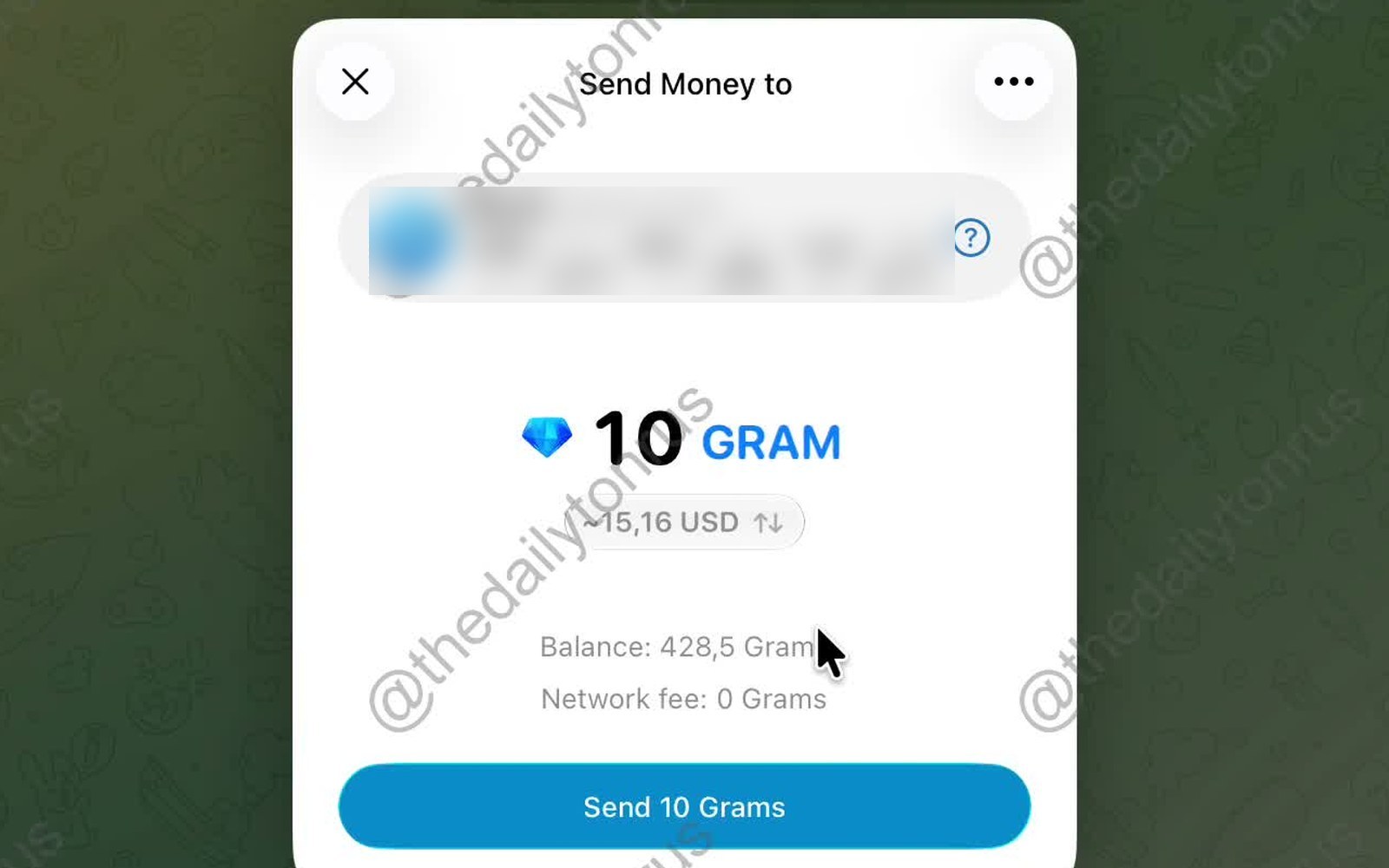
A GRAM transfer screen from the built-in wallet has appeared in Telegram's macOS beta version. On it, the amount can be switched between GRAM and dollars, and a comment can be attached to the transfer — by default, only the sender and recipient can read it, and the transfer itself remains in the chat as a blue card. Currently, only beta testers can see the screen, and in the first demonstration, it was stated that the interface might change before release.
How the transfer looks
The window is titled Send Money to. At the top is the recipient: name, username, and TON blockchain wallet address. A question mark next to the address opens an explanation: this address is linked to a specific Telegram account. The transfer goes not to a "user" but to an address, and the interface shows whose it is.
Below is the amount: "10 GRAM", with "≈15,16 USD" beneath it, and ↑↓ arrows. The arrows swap the currencies: the dollar amount becomes primary, and GRAM moves to the subtitle. Below the amount are the balance and network fee; in the video, it shows "0 Grams".
A comment is added via the "..." menu. The field is labeled Optional message, with a Make comment public checkbox below it, accompanied by an explanation: a public comment can be read by anyone on the blockchain; otherwise, only the sender and recipient can read it.
After sending, a service line "You sent … 10 Grams ($15,16)" and a blue card "−10 Grams" with the recipient's name and address appear in the chat. The card opens the transaction screen.
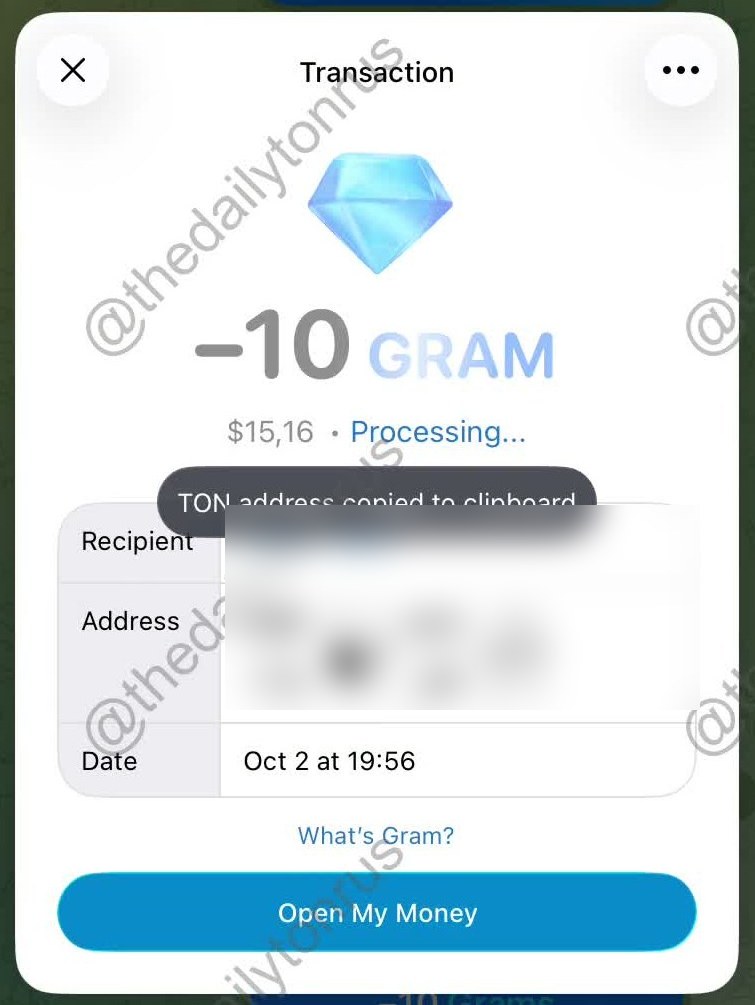
On it are the amount with a minus sign, its dollar equivalent, the status Processing…, the recipient, address, and date. Below are two buttons. What's Gram? explains that it is the native currency of the TON blockchain and states the exchange rate ("1 Gram currently equals $1,52") with three points — fast, cheap, useful. Open My Money leads to the wallet itself. Money is what the wallet might be called in the settings menu, according to interface analysis.
What changed in the build
The morning after the demonstration, October 3, beta build 12.10.283258 was released. According to gramnews.org's datamining of app builds, the WalletUI module in this build gained the default.metallib file — compiled Metal shaders, Apple's graphics API. Simultaneously, the binary saw the appearance of WalletSendAmountCanvas, WalletSendAmountLayer, WalletSendAmountMetal, WalletSendAmountMorph, and WalletSendMotionClock classes, as well as the string "Wallet send glyph atlas".
Judging by the names, the amount on the send screen is now rendered by the GPU, not as ordinary text.
What is a glyph atlas
A glyph is an image of a single font character. A glyph atlas is a single texture into which necessary characters, such as digits from 0 to 9, a comma, and a currency sign, are pre-rendered. The shader does not rasterize the font anew with each frame but takes ready-made pieces from the atlas, allowing one digit to smoothly "morph" into another. The word Morph in the class name indicates precisely such a transition, and MotionClock refers to its own animation clock. This interpretation is based on the names: the macOS client source code has not been openly updated since 2025.
The video was recorded on October 2, using an earlier build — the amount animation was reworked after the screen was shown.
Private and public comments
On the TON blockchain, a transfer can have two types of comments. An open comment is stored in the transaction as plain text and can be seen by any blockchain explorer. An encrypted comment is encrypted with a key derived from the sender's key and the recipient's public wallet key — only the two parties can read it. The Make comment public checkbox chooses between these two types, and it is off by default.
What else is being prepared
The send screen is not only being prepared for macOS. On October 1, strings Wallet.Info.SendTitle (send title), Wallet.Recipient.InvalidAddressText (invalid address error), and Wallet.Recipient.NoRecentRecipients (empty list of recent recipients) were added to Telegram's iOS transfer platform. On the same day, the message "This wallet address is invalid. Check it or try another address" appeared in the macOS beta binary.
On October 3, notifications for incoming GRAM transfers were added to the iOS strings: with the amount in fiat currency (Notification.GramTransfer.WithFiat) and from an unknown sender (Notification.GramTransferUnknown).
The interface analysis of the new wallet lists other screens as well: a Collectibles tab with NFTs at the address, a QR code screen for top-ups, buying GRAM with a card, via P2P or by exchanging from another network — with Walt acting as the payment operator — and a suggestion to enable two-factor authentication after wallet creation.
Gram Wallet itself first appeared in the macOS beta on August 31.