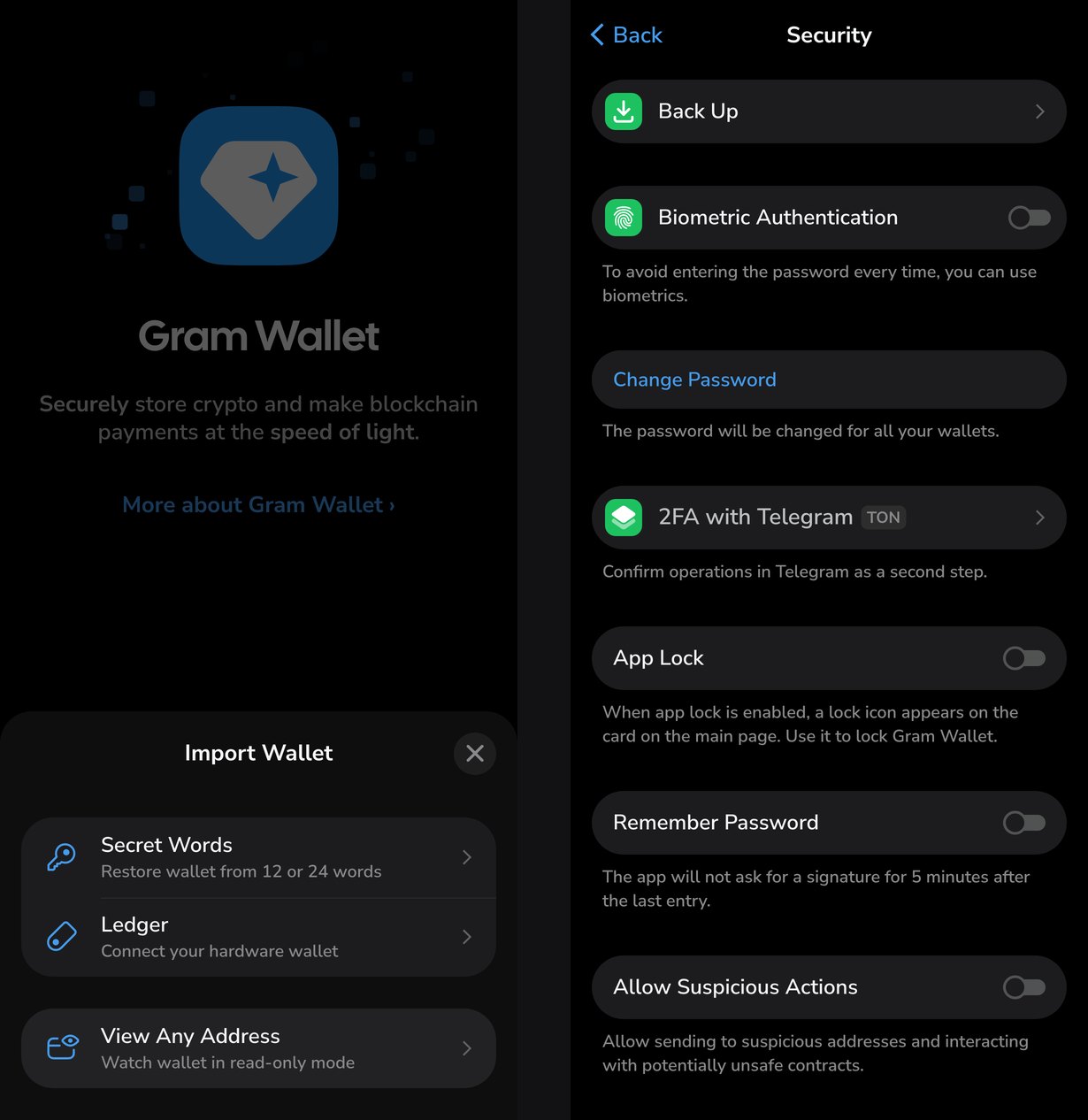
The secret phrase is the only way to get Gram Wallet back on a new device or after the app is deleted. A new wallet issues a 12-word phrase. You can view the phrase again under Settings → Security → Back Up, and restore the wallet with the Import Existing Wallet button on the start screen. Phrases of 12 or 24 words work, including those from the old wallet.ton.org and other TON wallets. A forgotten phrase cannot be recovered by anyone: the wallet is self-custodial, and neither the team nor Telegram keeps a copy of the keys. Everything below was checked against version 26.9.9 and the open-source code as of October 6, 2026.
What the secret phrase is
The wallet's private key is derived from the phrase, and the address from the key. Whoever has the phrase controls the wallet fully, on any device and in any compatible app. The password and biometrics in Gram Wallet only protect the copy of the key on that device: on another device they are not needed if you have the phrase.
| Where the phrase comes from | Words | What it gives in Gram Wallet |
|---|---|---|
| New Gram Wallet | 12 | addresses on all twenty networks |
| Old wallet.ton.org, Tonkeeper, Tonhub | 24 | a TON address only |
| Telegram's built-in wallet | 12, 24 after a key change | support appeared in the code on October 6, see below |
| Other BIP39 wallets | 12 or 24 | addresses on the networks the wallet knows |
The difference between 12 and 24 words is not the length but the standard. Gram Wallet creates its twelve words under BIP39, the standard shared by Ethereum, Solana and Bitcoin, and one phrase yields addresses on every network. A 24-word phrase from older TON wallets was created under TON's own rules and yields a TON address only. That is why an imported old wallet will not get other networks.
How to view the phrase again
- Open Settings → Security.
- Enter the password or confirm with biometrics.
- Tap Back Up and confirm the three warnings.
Gram Wallet shows the same words as at creation. If the word check was skipped at creation, the home screen carries a "Wallet is not backed up" warning. A regular build does not let you skip it, so this only happens to wallets from test builds.
How to store the phrase
The words screen warns in red: do not show the phrase to anyone and do not enter it anywhere. In practice this means:
- write it on paper in order and with numbers, in two copies kept in different places;
- do not photograph or copy it into notes, messengers or cloud storage: the Copy to Clipboard button puts the phrase on the clipboard, where any app with clipboard access can read it;
- do not enter it on websites or in bots that promise to "verify", "sync" or "unlock" the wallet. The phrase goes only into the wallet itself, when restoring it.
Protection against a stolen phrase comes from two-factor confirmation through Telegram, Settings → Security → 2FA with Telegram. With it, the phrase alone is not enough to send funds: every operation has to be confirmed in the @tgmfabot bot from your Telegram account. The protection applies only to assets on TON and requires a W5 wallet. Setting it up costs 0.15 Gram.
How to restore the wallet
- Install Gram Wallet or open wallet.ton.org.
- Tick "I agree to use the wallet responsibly" and tap Import Existing Wallet.
- Choose Secret Words and enter the 12 or 24 words in order.
- Set a new password or biometrics.
The old password is not needed for restoring: it protected the copy on the previous device and stayed there with it.
Besides the phrase, import accepts a private key of 64 hexadecimal characters. The same screen has two more options: Ledger connects a hardware wallet, and View Any Address opens any address read-only, without the right to send.
If the balance is empty after restoring
On TON, one phrase gives several addresses, one for each version of the wallet contract: v3R1, v3R2, v4R2, W5. Gram Wallet creates new wallets on W5, while a phrase from an old wallet may have been used with v4R2 or v3R2. The coins have not gone anywhere: they sit at the address of a different version.
Gram Wallet checks the other versions on its own. If they hold tokens, it offers to import them, and a Wallet Versions item appears in the settings, where you can switch to the version you need. The address the wallet used before can be checked against the transfer history in a blockchain explorer.
The phrase of Telegram's built-in wallet
The wallet built into Telegram exists only in beta builds so far, and its phrase works differently:
- 12 words are issued at creation. After a key change, 12 more are added and the phrase becomes 24 words long: the first half still defines the address, and the second signs transfers;
- by default a copy of the key is kept in the Telegram cloud: the key is encrypted, split into three parts and stored in data centres on three continents. It can be put back together only on the owner's devices. The copy can be turned off, and then the phrase has to be entered in every new Telegram session;
- the beta has a string saying that only a phrase created in Telegram can be imported into the built-in wallet.
The way in the other direction is being prepared: on October 6, the telegram contract version and recognition of a phrase made of two 12-word halves were added to Gram Wallet's open-source code. This means a wallet from Telegram will open in the standalone app with its phrase. Version 26.9.9, which currently runs at wallet.ton.org, does not have it yet.
Why Telegram's wallet needs key changes
A regular TON wallet's address is tied to its key: changing the key means moving to a new address. The telegram contract works as a trampoline: every Telegram wallet has the same code, and it takes the executable code from the blockchain's configuration. The address is derived from the first half of the phrase and does not change, while the right to sign passes to the new key. This way the key can be changed, for example if the phrase may have leaked, and the address people already send Gram to stays the same. If the second half of the phrase does not match the current key, the wallet replies that the key may already have been changed.
If the phrase is lost
As long as the wallet opens on some device, you can view the phrase in Back Up and write it down again. If there is no phrase and the wallet opens nowhere, access is lost. Support at @mysupport cannot bring it back: it has no keys.
If only the password is forgotten and you have the phrase, remove the wallet from the device and restore it from the phrase with a new password.