Gram Wallet is a self-custodial wallet that Telegram released together with the My Wallet team. It comes in two forms. The standalone app for iOS, Android and the web at wallet.ton.org works for everyone. The wallet built into Telegram itself exists only in beta builds so far and is switched off on the server. The keys are held by the owner alone: without the secret phrase, neither the team nor Telegram can restore access. Everything below was checked against version 26.9.9 and the open-source code as of October 6, 2026.
Where to get Gram Wallet
| Where | What it is | Link |
|---|---|---|
| iPhone and iPad | App Store app | id6763345750 |
| Android | Google Play app, package io.gramwallet.app | Google Play |
| Browser | web version | wallet.ton.org |
| Chrome | Gram Wallet extension | build in the code |
| Telegram | built-in wallet | beta builds only for now |
All download links are collected at gramwallet.io. Gram Wallet has no desktop app and no mini app inside Telegram: in the build scripts those versions are built for My Wallet only.
The web version took over the address of the old TON wallet: wallet.ton.org is now built from the same code as the app. Wallets created there earlier open as before. The web version itself still recommends installing the app or the extension: in a browser the keys live in the page's storage rather than in the phone's secure storage.
How to create a wallet
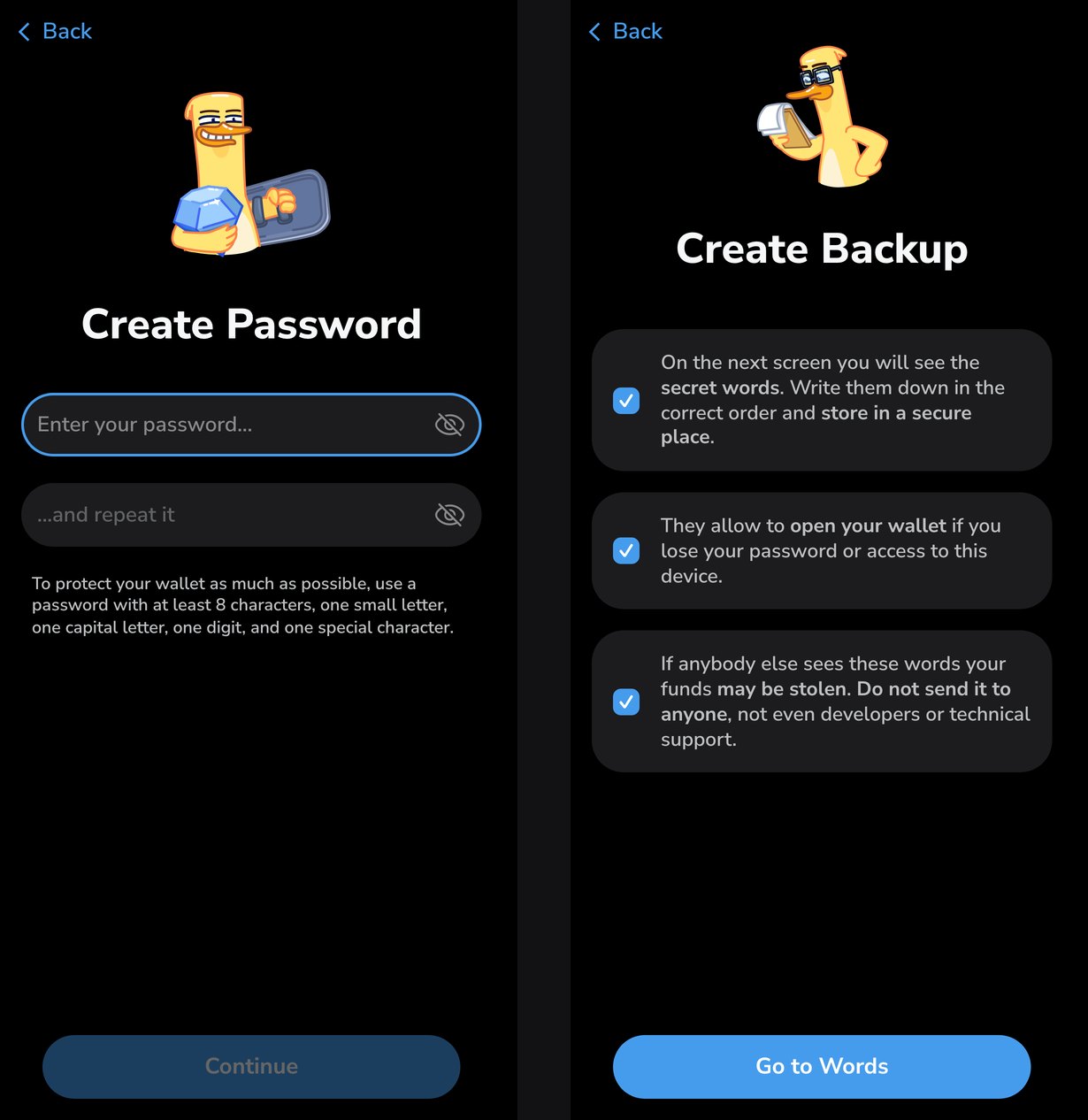
- Open the app or wallet.ton.org, tick "I agree to use the wallet responsibly" and tap "Create New Wallet".
- Choose the protection: biometrics or a password. The password must be at least 8 characters long, with a lowercase letter, a capital letter, a digit and a special character.
- Tick the three warnings about the secret words and tap "Go to Words".
- Write the 12 words down on paper, in order.
- Pass the check: the app asks for three words by their numbers and offers four options for each.
- Tap "Open Wallet".
The word check cannot be skipped: the "open without checking" button exists only in test builds. The word numbers for the check are picked at random, so memorizing three words instead of twelve will not work.
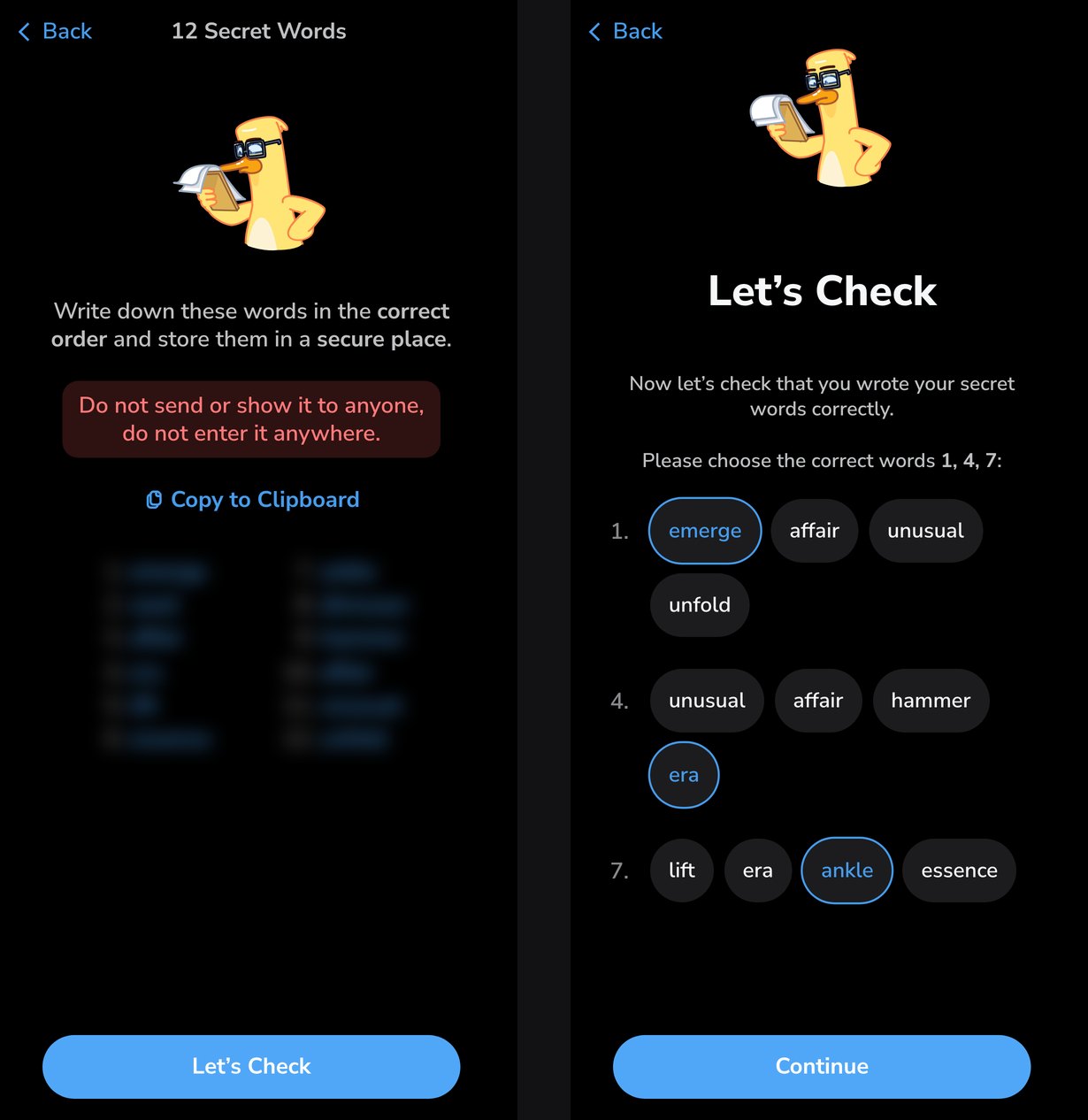
A new wallet gets 12 words, not the 24 that most TON wallets use. The phrase is generated under the BIP39 standard shared by Ethereum, Solana and Bitcoin. That is why a single phrase gives addresses on every network the wallet supports, not just TON. How to store the phrase and how to restore a wallet with it is covered in a separate guide.
What is on the home screen
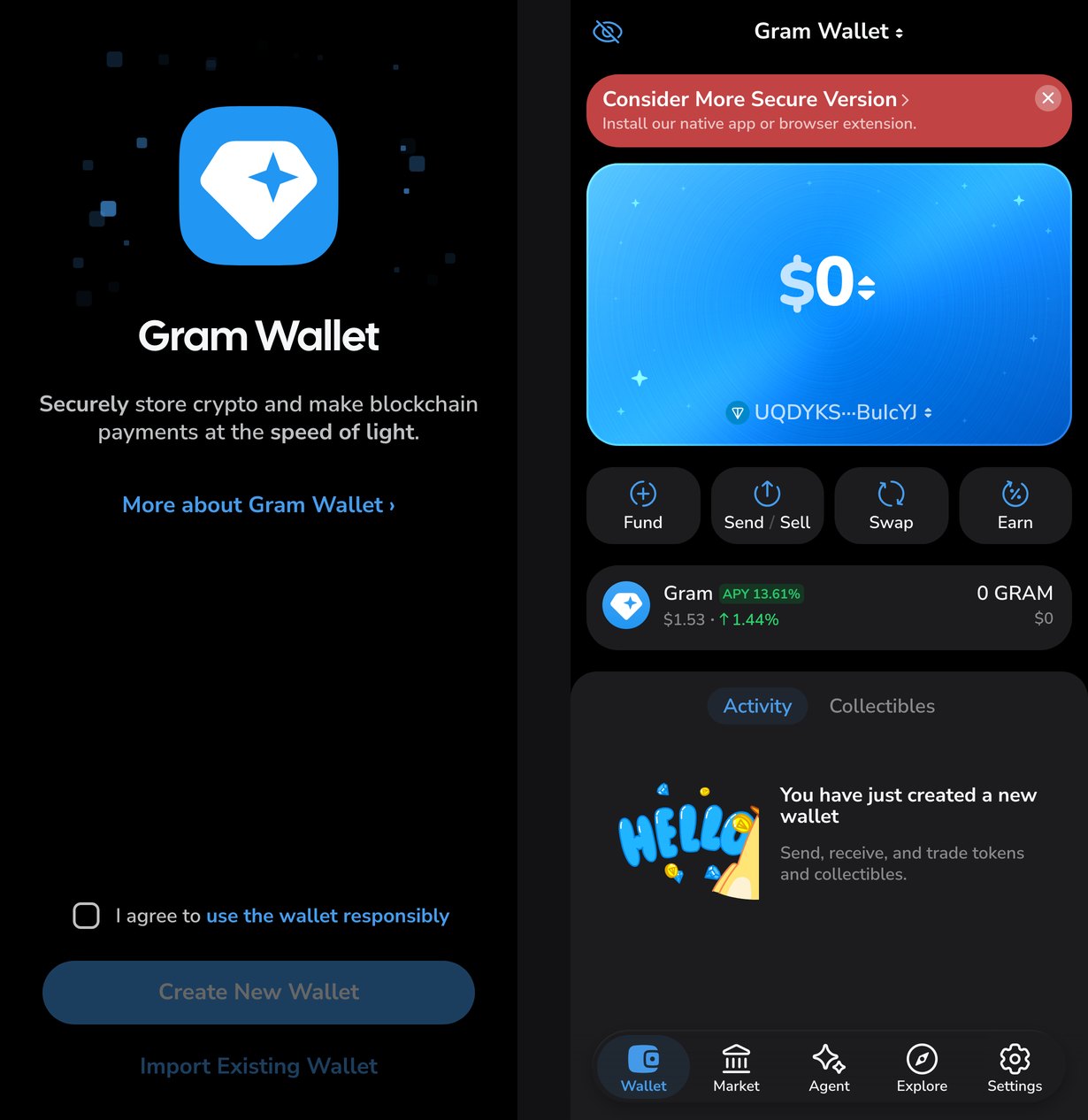
Under the balance card there are four buttons:
- Fund — top up: the address and QR code, buying with a card or with crypto, a deposit link;
- Send/Sell — send or sell;
- Swap — exchange one coin for another;
- Earn — Gram staking.
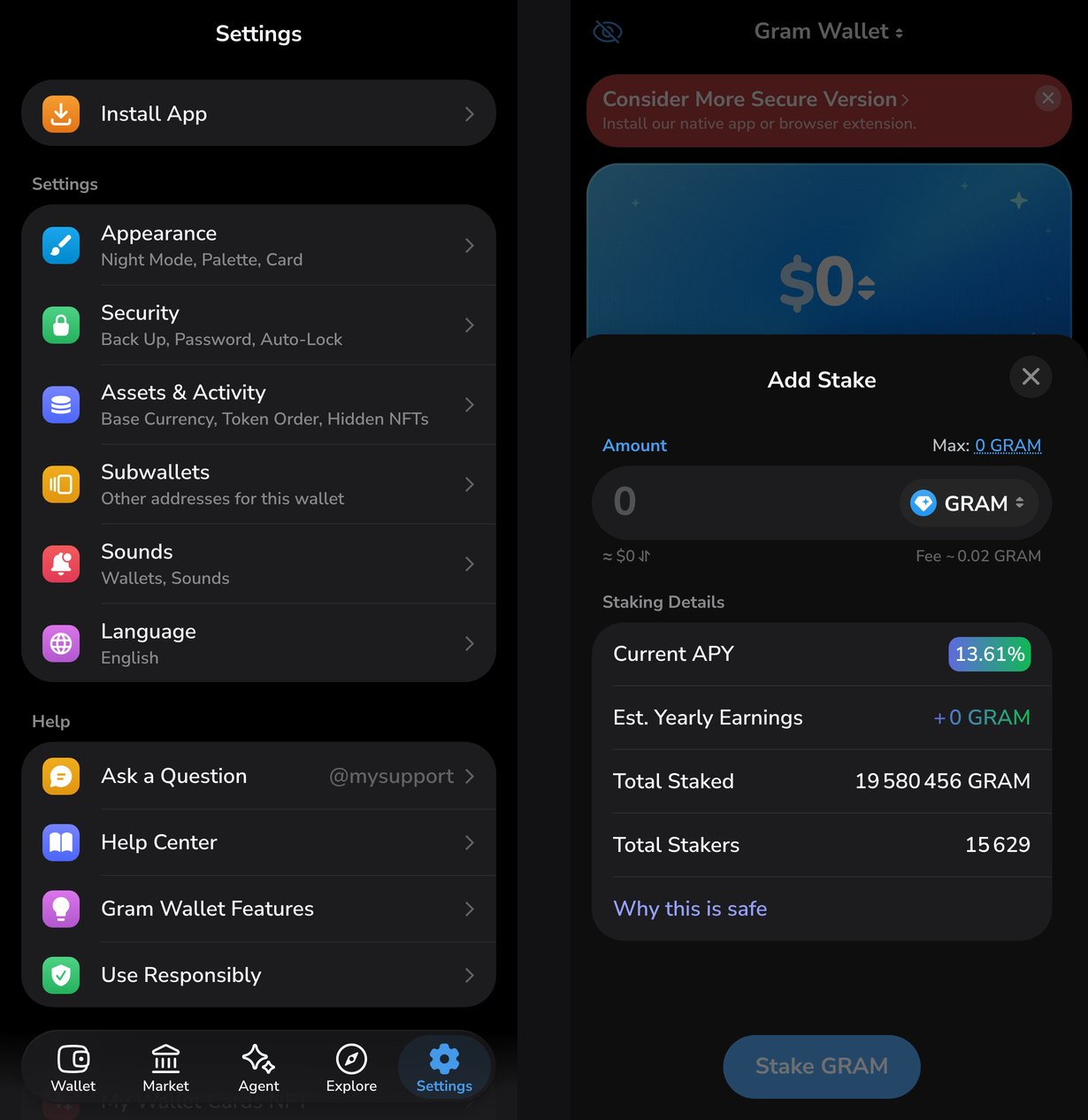
At the bottom there are five tabs: Wallet, Market, Agent, Explore and Settings.
The TON network's coin is called Gram in the wallet, ticker GRAM. It is the same coin as Toncoin: it was renamed after a vote, and the wallet shows the new name.
Which networks it supports
The wallet works with twenty networks: TON, TRON, Solana, eleven EVM networks including Ethereum, Base, BNB and Arbitrum, and five UTXO networks including Bitcoin. By default only Gram is enabled: other networks are added in the asset settings. This is the main difference between Gram Wallet and My Wallet, whose code it is built from. My Wallet shows every network at once, while Gram Wallet starts with TON.
Wallets carried over from the old wallet.ton.org will not get other networks at all. Their 24-word phrase was created under TON's own rules rather than BIP39, and it cannot produce addresses on other networks.
Staking
The Earn button puts Gram into a liquid staking pool. On October 6 the screen showed a 13.61% annual yield, 19,580,456 Gram in the pool and 15,629 stakers. The minimum is 1 Gram, and the network fee to stake is about 0.02 Gram. Nominator pools in the same code accept 10,000 Gram or more.
Security
Under Settings → Security:
- Back Up — show the secret words again, after the password;
- Biometric Authentication — fingerprint or face unlock instead of the password;
- 2FA with Telegram — a second confirmation of operations in Telegram;
- App Lock — auto-lock: off, 30 seconds, 3 or 10 minutes, 10 minutes by default;
- Allow Suspicious Actions — allow sending to suspicious addresses. Off by default.
Two-factor protection through Telegram exists only in Gram Wallet; My Wallet can only turn it on through Gram Wallet. Once it is on, every transfer is signed with the password and then confirmed in the @tgmfabot bot. A stolen secret phrase is then not enough to move funds: your Telegram account is needed too. The protection covers only assets on the TON network. Setting it up costs 0.15 Gram.
How 2FA works on the blockchain
A W5 wallet can attach extensions — separate contracts allowed to send transfers on its behalf. Gram Wallet installs such an extension: its data holds the Telegram user number, the wallet address and the phrase's public key. A transfer signed with the password goes not to the network but to a confirmation server, and the extension sends it to the network after the answer in the bot. That is why 2FA is available only to W5 wallets, not to v4 and older. Free transfers paid with a fee in the token are switched off while 2FA is on.
How the built-in Telegram wallet differs
The wallet inside Telegram itself is a different app with the same name. Its engine is written at TON Core, and since September 18 it has been visible in the macOS betas. The main version of Telegram does not have it: the wallet_available key in the test servers' config is set to false.
According to the strings in the beta builds, the built-in wallet has things the standalone app lacks:
- transfers in a chat. The "Money" item in the attachment menu sends Gram to the person you are chatting with, and the transfer arrives in the conversation as a card;
- five free transfers a day. Telegram pays their fee, for transfers of 0.1 Gram or more;
- an address with its owner's name. The built-in wallet's address in a chat is labelled with the account it belongs to;
- a backup in the Telegram cloud. The encrypted key is split into three parts and stored in data centres on three continents. It can be put back together only on the owner's devices.
The standalone app does not send to a bare @username. It finds the recipient by address or by domain: .ton, .t.me for Fragment usernames, .vip and .grm. Transfers are covered in detail in the guide to sending and receiving Gram.
Gram Wallet and Walt
The @wallet wallet, called Wallet for years, became Walt on September 28. It is a custodial service: the company holds the keys, and you sign in with your Telegram account. Its place in Telegram's settings will go to the built-in Gram Wallet, and Gram Wallet top-ups will run through Walt's infrastructure.
| Gram Wallet | Walt | |
|---|---|---|
| Keys | with the owner, 12 words | with the service |
| Recovery | only with the secret phrase | with the Telegram account |
| Where it runs | apps, web, extension | mini app in Telegram |
Fake Gram Wallets
Gram Wallet's official addresses are listed in the app's code: the gramwallet.io website, the wallet.ton.org web version, the io.gramwallet.app package in the stores, @mysupport for support and the news channels @MyWalletEng and @MyWalletRus. The channels @gram_wallet and @thegramwallet are named "Gram Wallet", but they are not on that list, and they have no verification badge either.
The wallet never asks for the secret words on a website, in a bot or in a support chat. The red banner on the phrase screen says the same thing: do not show the phrase to anyone and do not enter it anywhere.