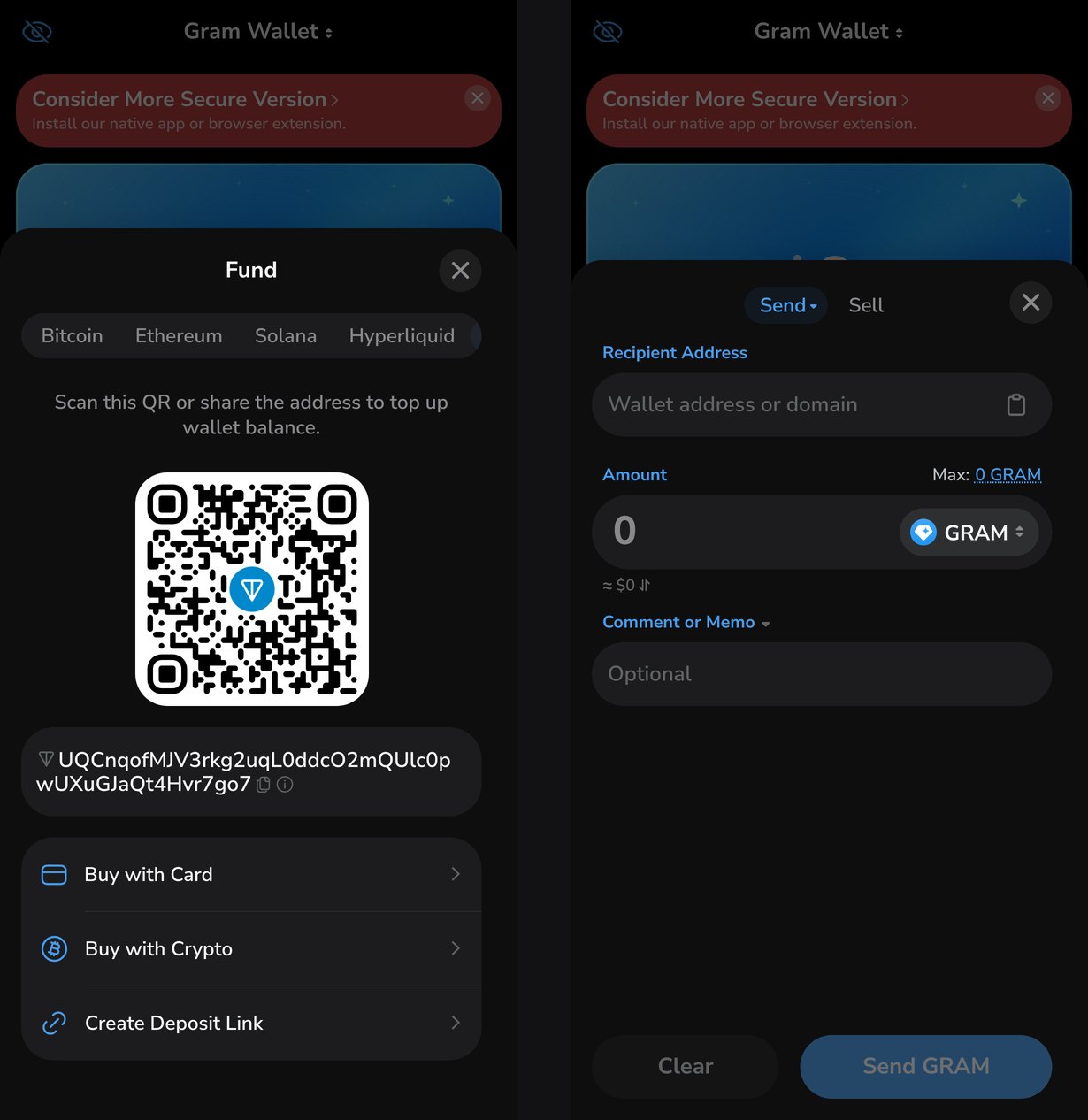
In Gram Wallet, Gram is sent with the Send/Sell button: the recipient is given as an address or a domain, the amount in Gram or in dollars, and a comment is optional. The network fee for a regular transfer is about 0.015 Gram. Gram is received to the address or QR code behind the Fund button, which is also where card purchases live. Sending to an @username in a chat exists only in the wallet built into Telegram, and that is not switched on yet. Everything below was checked against version 26.9.9 and the open-source code as of October 6, 2026.
How to receive Gram
- On the home screen, tap Fund.
- Pick the network at the top; TON is selected by default.
- Copy the address or show the QR code to the sender.
A wallet address on TON starts with UQ. It is the non-bounceable form of the same address as EQ: both lead to one wallet, and the only difference is a flag at the start of the string. A transfer to an EQ address with no contract deployed yet is bounced back to the sender by the network, while a transfer to UQ is credited. That is why a new wallet is given its UQ address.
On the same screen, Create Deposit Link makes a link of the form ton://transfer/<address> that can carry a preset amount and comment. The sender only has to open it and confirm the transfer in their own wallet.
How to buy Gram
The Fund screen has two buttons:
- Buy with Card — a card purchase through MoonPay. For rubles, the wallet picks Avanchange if it serves the selected network.
- Buy with Crypto — exchanging another cryptocurrency for Gram, with a transfer from an external wallet or an exchange.
The provider shows its fee and the purchase terms on its own screen before you pay.
How to send Gram
- Tap Send/Sell, then the Send tab.
- Paste the recipient's address or domain into Recipient Address.
- Enter the amount. The Max link above the field fills in the whole balance.
- Add a comment if needed.
- Tap Send GRAM and confirm with the password or biometrics.
A transfer on TON is confirmed within seconds. Its status and a link to the blockchain explorer appear in the Activity tab.
Sending the whole balance with Max takes the fee out of the transfer amount: the recipient gets slightly less than the balance was, and the wallet is left empty.
Who you can send to
The wallet understands two kinds of recipient:
| What to enter | Example | How it works |
|---|---|---|
| Address | UQ…, EQ… | transfer straight to the address |
| Domain | name.ton, name.t.me | the wallet looks up the address through TON DNS |
Four domain zones are supported: .ton, .t.me, .vip and .grm. A .t.me domain is a Telegram username bought on Fragment: such a name has an owner on the blockchain, who can link their wallet to it. A regular @username, taken for free in Telegram's settings, does not work as an address. The standalone app cannot send to it.
Comment and memo
The Comment or Memo field is optional, but it can be mandatory when you top up an exchange. An exchange receives every client's transfers to one address and tells them apart by the memo. A transfer to an exchange without a memo reaches the exchange but not your account, and getting it back means going through the exchange's support. For addresses on its list of known addresses, Gram Wallet marks the field as Required itself and will not send the transfer without a memo. The same list flags scam addresses.
The arrow next to the field's name switches the comment to Encrypted Message. Only the sender and the recipient can read such a comment; the blockchain explorer shows ciphertext. Encryption is not possible if the recipient is not a wallet or has never sent a transfer from its address.
Why encryption needs an outgoing transfer from the recipient
The comment is encrypted with the recipient's public key. On TON, a wallet's public key becomes visible once the wallet contract is deployed, and that happens with its first outgoing transfer. An address that has only received coins has no contract yet. It has had no occasion to publish its key, so there is nothing to encrypt with.
How much a transfer costs
The fee is charged by the TON network, not by the wallet. Before sending, Gram Wallet budgets 0.015 Gram, and the exact amount appears in the form once the address and the amount are entered. Sending tokens such as USDT costs more than sending Gram: besides the wallet itself, the token's contract takes part in the transfer.
If the balance holds less than 0.1 Gram and you need to send a token, the wallet offers to pay the fee in that token or in Telegram Stars. This works not with every token but with those the wallet's server has enabled it for. It is unavailable while 2FA through Telegram is on.
Transfers in a Telegram chat
Sending Gram to someone straight from a conversation is a feature of the wallet built into Telegram, not of the standalone app. In the beta builds it works like this:
- the "Money" item in the attachment menu opens a transfer screen with the amount in Gram or dollars and a comment;
- the comment is encrypted by default, and a separate checkbox makes it public;
- the transfer arrives in the chat as a card with the amount;
- the first five transfers a day are free, and Telegram pays their fee. The minimum amount is 0.1 Gram, set in the server config.
The main version of Telegram does not have this yet: the wallet_available key that switches the wallet on is set to false.